GSplit is the main application that splits files and creates Self-Uniting Executable files. If you would like to join pieces together if no Self-Uniting program is available, you have to use the another shipped program named GUnite.
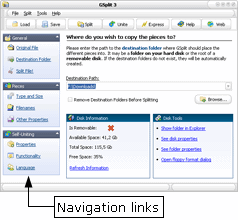
To navigate through the different options, use the navigation links on the left side of the window. Options are grouped in three categories: General, Pieces and Self-Uniting.
Actually, you just need to select the file you wish to split, indicate where its pieces have to be copied to, and finally, choose the type of pieces you want - generally blocked i.e. with a specific size.

 GSplit
 GSplit is the main application that splits files and creates Self-Uniting Executable files. If you would like to join pieces together if no Self-Uniting program is available, you have to use the another shipped program named GUnite.